Note taking script
18. 5. 2026Teaser ↓
Another note-taking app? Yes, there are billions. Basic CRUD for the CLI? Absolutely. No databases, no config files, no setup – just a single bash script and a plain text directory. Unapologetically terminal-first – works over SSH, in tmux, on a Raspberry Pi, or on a 15-year-old laptop. If you have a shell, you have a notes app.
No linking, no Zettelkasten, no forcing it into more than text (yes, you can write Markdown, but it’s optional).
If you’re here for the code – it’s one file. Read it, break it, change it. That’s the point.
note ↓
needs: fzf, ripgrep (rg)
note --help

Usage:

note n "title"          → new note with explicit title
note "text"             → create/reopen note
note l                  → list
note o                  → open (fzf)
note s                  → search (rg|fzf)
note c                  → cat latest n notes
note rm                 → move to .trash
note pull               → git pull
note push               → git push
note --longhelp | less  → full help
note h                  → this help

Storage: /home/b/notes
Multiple parameters to run same command, for example
note
# and
note open
are the same (neat little dual pane tui is presented), and if you add a parameter (file name approximation)
note open gemma
it will open first filename that has some gemma in there. Search is similar.
note s
will open neat little tui as well, piping ripgrep output to fzf and behaving like file selector.
note c
note c 3
should cat last changed note or last 3 changed notes.
note list
should list files/notes to stdout, not sure if this is needed (open does similar job).
Text editor, by default $EDITOR variable is used, if undefined it will try to load hx (helix) or vim or nano. Configure to your needs. By default notes will be stored in $HOME/notes, configure as needed.
Not needing the specific title is the idea as well, so
note nice weather today
shall make a note with filename ‘2026-04-27-nice-weather-today.md’.
misc ↓
about fzf scrolling ↓
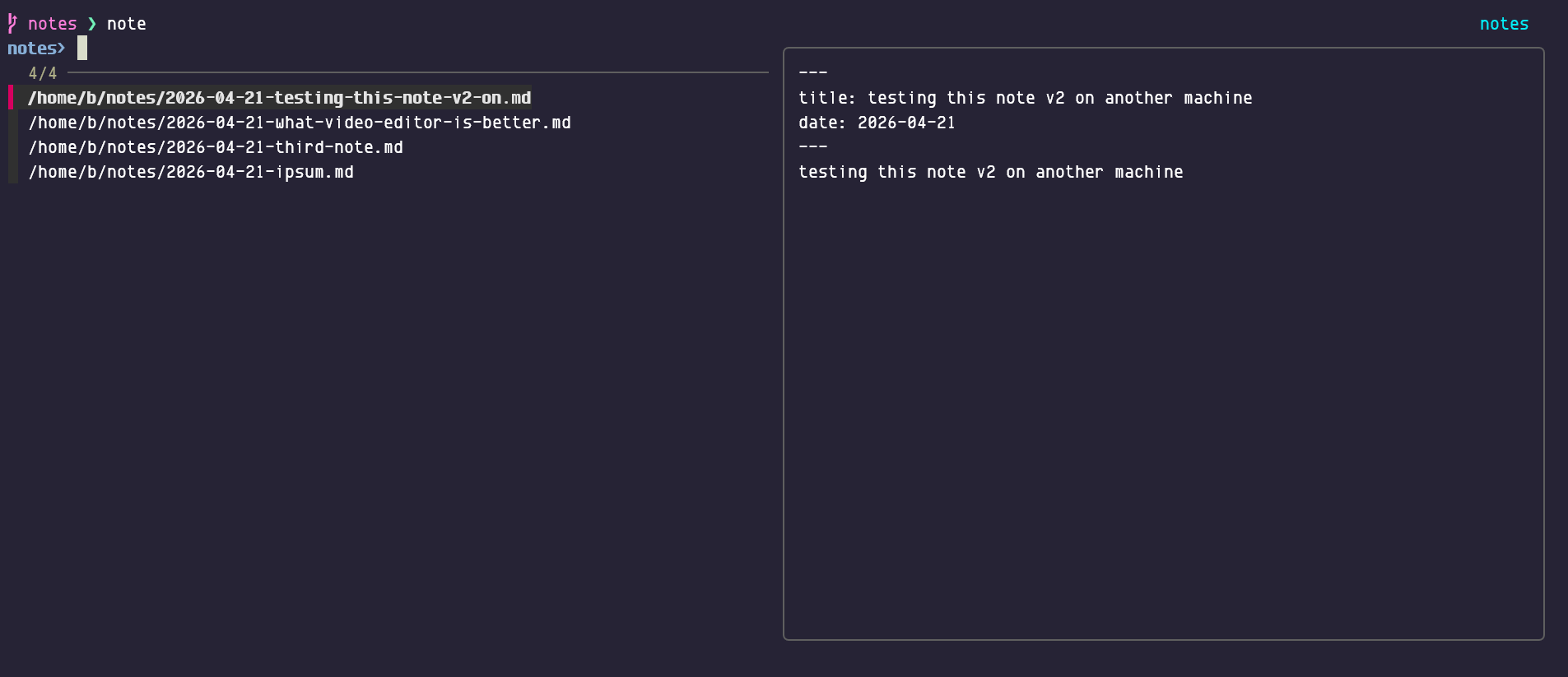
Up and down will select files, shift+up and shift+down will scroll the text pane on the right (mice should also work).
Scrot (‘open note’ fzf tui):
Note syncing ↓
of $HOME/notes is up to the user. I use git.
noteurls (‘plugin’) ↓
Separated script with similar tui that will extract urls from notes and open one or two in browser (tab toggles selected).
llm-md-fix ↓
Fix markdown using local gemma4 model. Will write ‘fixed’ version to stdout. (Much faster version would be node cli tool markdownlint --fix some.md)
noteweb ↓
Display notes in localy generated html page (needs rewrite).
pipe to ↓
Find the 1st note that has ‘jobs’ in the title and pipe to terminal markdown renderer:
note c jobs | glow -w 120
Pretty neat markdown render in terminal. Glow is in Trixie repos.
convert to html and open in browser ↓
note c jobs | pandoc -s -f markdown -t html5 -H style.css -o tmp.htm && xdg-open tmp.htm
Would take first note that has ‘jobs’ in its name.
Where style.css might be:
<style type="text/css">
    p, ul, li   { font-family: "Noto Serif", serif; font-size: large }
    /* .date   {font-size: small;} */
    a       { font-family: "Noto Serif", serif; font-size: large }
    pre     { font-size: large; color: #f5f5f5; background-color: #464876; padding: 20px; border-radius: 5px;}
blockquote  { margin: 0; color: #111111; border-left: 1px solid #999999;}
    h1      { text-align: center; font-family: 'Noto Sans', sans; font-size: xxx-large }
    h2, h3, h4      { font-family: "Noto Sans", sans; }
    hr      { border-top: 1px solid black; visibility: hidden; }
    a:link  { text-decoration: none; color: #111155; }
    a:visited { text-decoration: none; color: #111155; }
    a:hover { text-decoration: underline; }
    a:active { text-decoration: underline; }
    body, html {
        background-color: #F5F5F5;
        color: #111111;
        line-height: 1.6;
        }
</style>